CapCut AI Logo Generator for Restaurants and Cafes: Branding Made Simple
In the food and beverage industry, first impressions matter just as much as flavor. Before customers taste your coffee, burgers, or desserts, they see your logo. It appears on your signboard, menu, food packaging, delivery apps, and social media. A strong logo helps your restaurant or café look professional, memorable, and trustworthy.
The good news? You no longer need to hire an expensive designer or spend weeks brainstorming ideas. With the CapCut AI Logo Generator, restaurants and cafés can create stunning logos in minutes—even with zero design experience. Powered by AI and simple editing tools, CapCut makes branding fast, affordable, and stress-free. Paired with CapCut’s AI Writer, restaurants and cafés can also generate menu descriptions, slogans, and promotional copy that match their logo and strengthen overall brand identity.
Why Logos Matter for Restaurants and Cafés
A logo is more than just an image—it’s your brand’s personality. For restaurants and cafés, a great logo:
- Builds instant recognition
- Sets the mood (cozy café, luxury dining, fast food, or street food)
- Helps customers remember your brand
- Creates consistency across menus, signage, delivery apps, and social media
Whether you run a coffee shop, bakery, food truck, fine-dining restaurant, or takeaway café, your logo tells your story at a glance.
Why Use CapCut AI Logo Generator for Food Businesses?
CapCut AI Logo Generator is ideal for restaurant owners, café startups, and food entrepreneurs, as it combines AI-generatedcreativity with easy customization.
Key Benefits:
- No design skills needed – AI does the creative work
- Fast results – generate logos in minutes
- Affordable – perfect for small businesses and startups
- Flexible styles – modern, vintage, minimal, playful, or elegant
- High-resolution export – ready for print and digital use
Instead of starting from a blank page, CapCut turns your ideas into visual concepts instantly. You can also try CapCut Online Photo Editor to edit your cafe and food photos and showcase your unique style to your buyers.
Common Logo Styles for Restaurants and Cafés
Before creating your logo, it helps to think about the vibe of your food business:
- Cafés & coffee shops: Warm colors, handwritten fonts, minimalist icons
- Bakeries: Soft tones, cute illustrations, classic typography
- Fast food: Bold colors, strong shapes, eye-catching symbols
- Fine dining: Elegant fonts, simple layouts, premium colors
- Street food: Fun, playful, energetic visuals
CapCut AI understands these styles when you describe them clearly in your prompt.
How to Generate a Logo with CapCut AI Logo Generator for Restaurants and Cafés
Step 1: Describe Your Restaurant or Café Logo Idea
Start by opening CapCut Desktop and creating a new project. From the main menu, go to:
AI Media → AI Image
Now, describe your logo idea in detail. Think about:
- Restaurant or café name
- Type of food or drinks
- Brand personality (modern, cozy, luxury, fun, vintage)
- Preferred colors and symbols
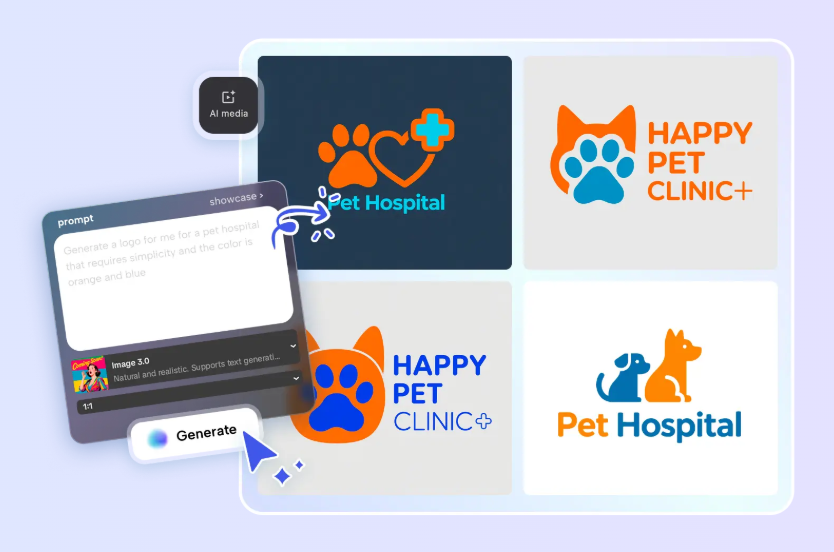
Example prompt: “Minimalist logo for a cozy coffee café with a coffee cup icon, warm brown tones, modern typography, and a friendly vibe.” You can also upload a reference image if you already have a style in mind. This helps the AI better match your vision.

Step 2: Generate Your AI-Powered Logo
Once your prompt is ready, choose a generation model that fits your needs. CapCut offers multiple AI models, including Seedream, Flux, and other advanced options, designed for creative visuals.
After selecting the model, click Generate. CapCut will instantly create logo designs based on your description. This step is where magic happens. You’ll see visual ideas that match your restaurant’s theme—saving hours of brainstorming and sketching. If the first result isn’t perfect, you can refine your prompt and generate again until you’re happy.
Step 3: Customize, Polish, and Export Your Logo
After generating your logo, it’s time to make it truly yours. Using CapCut’s built-in editing tools, you can:
- Add or adjust your restaurant or café name
- Change fonts to match your brand style
- Modify colors for menus, signs, or packaging
- Insert icons, stickers, or subtle effects
- Fine-tune layout and spacing
Once your logo looks just right, export it by selecting Export still frame from the menu. CapCut allows you to download your logo in high resolution (up to 8K), making it perfect for both digital and print use. Your logo is now ready for menus, storefronts, social media, food packaging, and delivery platforms.
Where to Use Your Restaurant or Café Logo
After creating your logo, use it consistently across all platforms:
- Restaurant signboards
- Menus and table cards
- Food packaging and takeaway bags
- Social media profiles and posts
- Online delivery apps
- Website and promotional materials
Consistency builds trust and helps customers recognize your brand instantly.
Conclusion
Branding doesn’t have to be complicated or expensive. With CapCut AI Logo Generator, restaurants and cafés can create eye-catching, professional logos without hiring designers or learning complex tools. From cozy cafés to busy restaurants, CapCut helps food businesses turn ideas into strong visual identities—quickly and effortlessly. If you want branding that looks modern, polished, and memorable, CapCut AI makes the process simple from start to finish.